
Compressor
The dedicated Compressor effect can be used to change the dynamic range of your signal by automatically reducing its gain if it exceeds a certain level. This is primarily a “pumping” compressor, designed to apply sharp ducking, but can also be used for more subtle peak-limiting.
 +
+ 
To open the Compressor page, press and hold SHIFT and press PAD 5 – COMPRESSOR.
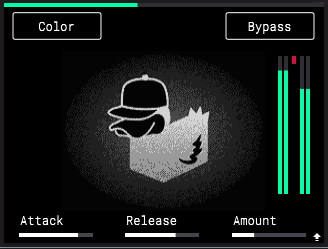
Press the B1 Function Button to activate or deactivate the Color effect for the compressor. This applies a slight parallel bass boost when activated, as well as minor pitch instability and harmonic saturation for a classic “tape warmth” effect.
Press the B3 Function Button to Bypass or engage the compressor effect.
Turn the K1 Knob to adjust the Attack phase of the compressor (0.100 – 150 ms). This determines how much time it takes to start applying compression and reducing the incoming signal gain after the audio signal passes above the threshold. High settings may allow some signal peaks to bypass the compressor.
Turn the K2 Knob to adjust the Release phase of the compressor (3.0 – 300 ms). This determines how much time it takes for the compressor to stop applying compression after the audio signal passes below the threshold.
Turn the K3 Knob to adjust the compressor Amount (0.00 – 100.00%). This determines how much compression is applied, and combines the threshold and ratio parameters of traditional compressor effects.
Press and hold SHIFT and turn the K3 Knob to adjust the amount of In Boost applied. This increase the incoming volume to the compressor, allowing it to work more aggressively.
Note: The traditional makeup gain compressor parameter is automatically calculated based on input level and overall parameter settings.
|