
Knob FX
MPC Sample’s Knob FX allows you to use the K1–3 KNOBS to control a single effect parameter, freeing your pads for other uses, such as triggering samples or sequences, or even in conjunction with the pads in Pad FX or Flex Beat modes.

To engage the Knob FX controls, press the KNOB FX button. Once enabled, the KNOB FX button lights up, and the current effect is briefly shown on the display.
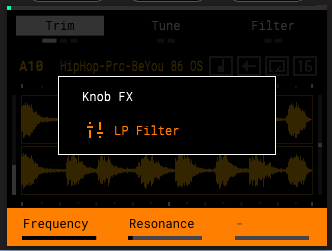
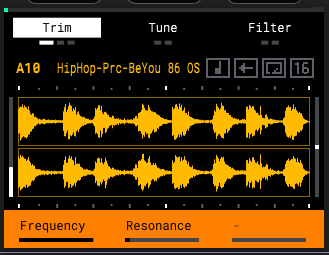
The bottom of the display will show the parameters available for control using the K1–K3 Knobs. If the Shift indicator is shown, you can press and hold SHIFT to access additional parameters for control using the K1–K3 Knobs.
While Knob FX is engaged, you are unable to use the K1–3 KNOBS for other functions, such as adjusting the Start/End points in Sample Mode or adjusting Pad FX parameters.
To disengage Knob FX mode, press the KNOB FX button again.
 +
+ To adjust the Knob FX settings, press and hold SHIFT and press the KNOB FX button.
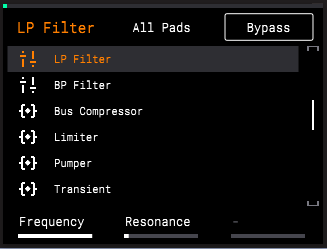
Knob FX can be applied to specific pads, or to all pads. Press a pad to enable Knob FX for that pad. Enabled pads are brightly lit, while pads unaffected by Knob FX are dimly lit.
Press the B2 Function Button to enable Knob FX on All Pads at the same time.
Press the B3 Function Button to Bypass Knob FX on all affected pads.
To select an effect for Knob FX, turn the ENCODER or press the -/+ buttons to browse the list of effects, and then press the ENCODER to load the highlighted effect.
See the following pages for a list of the available Knob FX, along with their descriptions and available parameters for control.
|
Effect
|
Description
|
Parameters
|
Values
|
|
Delay
|
This effect adds echo repeats to your source audio.
|
K1 – Time
|
|
|
When SYNC is ON:
|
1/32, 1/16T,1/32D, 1/16, 1/8T, 1/16D, 1/8, 1/4T, 1/8D, 1/4, 2/4T, 1/4D, 2/4, 5/8, 3/4, 7/8, 4/4, 5/4, 6/4, 8/4
| ||
|
When SYNC is OFF:
|
1 ms – 2.00 s
| ||
|
K2 – Feedback
|
0 – 100%
| ||
|
K3 – Mix
|
0 – 100%
| ||
|
SHIFT+K1 – Sync
|
Off, On
| ||
|
SHIFT+K2 – Damping
|
1.00 – 20.0 kHz
| ||
|
SHIFT+K3 – Width
|
0 – 100%
| ||
|
Diff Delay
|
This effect applies a delay with an adjustable amount of diffusion, emulating the dissipation of echoes in a reverberant space.
|
K1 – Time
|
|
|
|
When SYNC is ON:
|
1/64, 1/32, 1/16T,1/32D, 1/16, 1/8T, 1/16D, 1/8, 1/4T, 1/8D, 1/4, 1/2T, 1/4D, 2/4, 4/4T, 3/4, 4/4
| |
|
|
When SYNC is OFF:
|
1 – 1000 ms
| |
|
|
K2 – Feedback
|
0 – 100%
| |
|
|
K3 – Mix
|
0 – 100%
| |
|
|
SHIFT+K1 – Sync
|
Off, On
| |
|
|
SHIFT+K2 – Diffusion
|
0 – 100%
| |
|
|
SHIFT+K3 – High Damp
|
0 – 100%
| |
|
Tape Delay
|
This effect emulates a delay system using an analog tape loop and a series of tape heads to produce an echo effect.
|
K1 – Time
|
1, 1/2, 1/2., 1/4, 1/4., 1/8, 1/8., 1/16, 1/16.
|
|
|
K2 – Feedback
|
0 – 100
| |
|
|
K3 – Mix
|
0 – 100
| |
|
|
SHIFT+K1 – Wow/Flut
|
0 – 100
| |
|
|
SHIFT+K2 – Ramp
|
0 – 100
| |
|
|
SHIFT+K3 – Spread
|
0 – 100
| |
|
Sample Delay
|
This effect is a utility delay plugin that can delay the left and right channels by different, small amounts to loosen percussion elements or add stereo width.
|
K1 – Left
|
0.0 – 250.0 ms
|
|
|
K2 – Right
|
0.0 – 250.0 ms
| |
|
Reverb Small,
Reverb Medium,
Reverb Large
|
These are spatial effects, designed to emulate playing audio in an empty space, ranging from a small room to a large hall.
The settings for the three effects are identical.
|
K1 – Pre-Delay
|
0 – 250 ms
|
|
K2 – Time
|
0.4 – 71.5 s, +inf s
| ||
|
K3 – Mix
|
0 – 100%
| ||
|
SHIFT+K1 – ER/Tail Mix
|
0 – 100%
| ||
|
SHIFT+K2 – Density
|
0 – 100%
| ||
|
SHIFT+K3 – Low Cut
|
1 – 1000 Hz
| ||
|
Spring Reverb
|
This is a spatial effect, designed to emulate the sound of a spring reverb tank.
|
K1 – Pre-Delay
|
0 – 250 ms
|
|
|
K2 – Time
|
1.0 – 10.0 s
| |
|
|
K3 – Mix
|
0 – 100%
| |
|
|
SHIFT+K1 – Width
|
0 – 100%
| |
|
|
SHIFT+K2 – Diffusion
|
0 – 100%
| |
|
|
SHIFT+K3 – Low Cut
|
20.0 Hz – 1.00 kHz
|
|
Effect
|
Description
|
Parameters
|
Values
|
|
HP Filter
|
This effect applies a high-pass filter, suppressing frequencies below the cutoff point.
|
K1 – Frequency
|
10 – 19999 (Hz)
|
|
|
K2 – Resonance
|
0 – 100
| |
|
LP Filter
|
This effect applies a low-pass filter, suppressing frequencies above the cutoff point.
|
K1 – Frequency
|
22 – 19999 (Hz)
|
|
|
K2 – Resonance
|
0 – 100
| |
|
BP Filter
|
This effect applies a band-pass filter, suppressing frequencies above and below the cutoff point.
|
K1 – Frequency
|
55.0 Hz – 20.0 kHz
|
|
|
K2 – Resonance
|
0.7 – 20.0
| |
|
Bus Compressor
|
This is a transparent compressor, able to perform substantial volume adjustments without artifacts.
|
K1 – Attack
|
0 – 100
|
|
|
K2 – Release
|
0 – 100
| |
|
|
K3 – Threshold
|
-50 – 0
| |
|
|
SHIFT+K1 – Ratio
|
1 – 20
| |
|
|
SHIFT+K2 – Output
|
-6 – 24
| |
|
|
SHIFT+K3 – Mix
|
0 – 100
| |
|
Limiter
|
This effect changes the dynamics of a signal by boosting the entire signal so that the quietest parts are louder but peaks above a set level are limited.
|
K1 – Gain
|
-12.0 – 36.0 dB
|
|
|
K2 – Ceiling
|
-24.0 – 0.0 dB
| |
|
|
K3 – Release
|
10.0 ms – 10.0 s
| |
|
Pumper
|
This effect creates a rhythmic pumping effect, similar to that of sidechain compression.
|
K1 – Speed
|
Bar, 1/2, 1/2T, 1/4, 1/4T, 1/8, 1/8T, 1/16, 1/16T, 1/32, 1/32T
|
|
|
K2 – Shape
|
0 – 100%
| |
|
|
K3 – Depth
|
0 – 100%
| |
|
|
SHIFT+K1 – Attack
|
0 – 100%
| |
|
|
SHIFT+K2 – Hold
|
0 – 100%
| |
|
|
SHIFT+K3 – Release
|
0 – 100%
| |
|
Transient
|
This effect can be used to shape and accentuate the impact of percussive tracks and more.
|
K1 – Attack
|
-100 – +100%
|
|
|
K2 – Shape
|
0 – 100%
| |
|
|
K3 – Sustain
|
-100 – +100%
|
|
Effect
|
Description
|
Parameters
|
Values
|
|
Noise Gate
|
This effect is similar to a compressor, but instead of attenuating audio signal that rises above a threshold, a noise gate attenuates audio signal that falls below a threshold by a set amount. This can help reduce background noise in your audio signal.
|
K1 – Threshold
|
-120.0 – 0.0 dB
|
|
|
K2 – Depth
|
0 – -120 dB
| |
|
|
SHIFT+K1 – Attack
|
0.01 – 1000.00 ms
| |
|
|
SHIFT+K2 – Hold
|
0 – 1000 ms
| |
|
|
SHIFT+K3 – Release
|
1.00 – 3000.00 ms
| |
|
Amp Sim
|
This effect simulates guitar and bass amplifiers with a wide range of available cabinet models and tone shaping options.
|
K1 – Cab Model
|
D.I., Brit, 1x8”, 1x12”, 2x10”, 2x12, 4x10“, 4x12“, 1x15“ Bass, 4x10” Bass, Radio
|
|
|
K2 – Drive
|
0.0 – 11.0
| |
|
|
K3 – Soft Clip
|
0 – 100%
| |
|
|
SHIFT+K1 – Bass
|
-12.0 – 12.0 dB
| |
|
|
SHIFT+K2 – Mid
|
-12.0 – 12.0 dB
| |
|
|
SHIFT+K3 – Treble
|
-12.0 – 12.0 dB
| |
|
Tube Drive
|
This effect is designed to reproduce the sound of an overdriven tube amplifier.
|
K1 – Drive
|
0 – 100%
|
|
|
K2 – Headroom
|
-30.0 – 0.0 dB
| |
|
|
K3 – Saturation
|
0 – 100%
| |
|
Soft Clipper
|
This effect produces a range of saturation effects, from subtle warmth to harsh distortion.
|
K1 – Drive
|
1.0 – 10000.0%
|
|
|
K2 – Shape
|
Tanh, Sine, Parabolic
| |
|
|
K3 – Mix
|
0 – 100%
| |
|
|
SHIFT+K1 – True Peak
|
Off, On
| |
|
|
SHIFT+K2 – Rel Time
|
0.1 – 100.0 ms
| |
|
|
SHIFT+K3 – Post Lvl
|
-Inf, -80.0 – 0.0 dB
| |
|
Ensemble
|
This effect applies fluid, shimmering modulation effects to the audio signal.
|
K1 – Rate
|
0.1 – 10.0 Hz
|
|
|
K2 – Depth
|
0.00 – 24.00 ms
| |
|
|
K3 – Mix
|
0 – 100%
| |
|
|
SHIFT+K1 – Delay
|
0.00 – 24.00 ms
| |
|
|
SHIFT+K2 – Shimmer
|
0 – 100%
| |
|
|
SHIFT+K3 – Width
|
0 – 100%
| |
|
Multi-Chorus
|
This effect applies a thick, complex chorus effect to your audio signal.
|
K1 – Rate
|
0.1 – 10.0 Hz
|
|
|
K2 – Depth
|
0.00 – 24.00 ms
| |
|
|
K3 – Mix
|
0 – 100%
| |
|
|
SHIFT+K1 – Voices
|
3, 4, 6
| |
|
|
SHIFT+K2 – Delay
|
0.00 – 24.00 ms
|
|
Effect
|
Description
|
Parameters
|
Values
|
|
Phaser
|
This effect applies modulated filters to the audio signal, resulting in a sharp, “sweeping” sound.
|
K1 – Rate
|
0.10 – 10.00 Hz
|
|
|
K2 – Depth
|
0 – 100%
| |
|
|
K3 – Mix
|
0 – 100%
| |
|
|
SHIFT+K1 – Model
|
Vibe, Stone, Ninety, Tron
| |
|
|
SHIFT+K2 – Feedback
|
0 – 100%
| |
|
Flanger
|
This effect applies a short, modulating delay to the audio signal, resulting in a signature “whooshing” sound.
|
K1 – Rate
|
0.02 – 10.00 Hz
|
|
|
K2 – Depth
|
0 – 100%
| |
|
|
K3 – Mix
|
0 – 100%
| |
|
|
SHIFT+K1 – Feedback
|
0 – 100%
| |
|
Auto-Wah
|
This effect is a low-pass filter modulated by an envelope that yields a classic funky “wah-wah”- like sound. The envelope is triggered by the incoming signal’s amplitude.
|
K1 – Sens
|
0 – 100
|
|
|
K2 – Resonance
|
0 – 100
| |
|
|
K3 – Mix
|
0 – 100%
| |
|
|
SHIFT+K1 – Center
|
0 – 100
| |
|
|
SHIFT+K2 – Attack
|
0 – 100
| |
|
|
SHIFT+K3 – Release
|
0 – 100
| |
|
Auto-Pan
|
This effect uses an LFO to move the incoming signal back and forth across the stereo field, creating a rotary effect.
|
K1 – Rate
|
0 – 100
|
|
|
K3 – Mix
|
0 – 100%
| |
|
Vintage Emulator
|
This effect emulates the sonic qualities of different vintage hardware.
|
K1 – Type
|
MPC3000, MPC60, SP1200, SP1200Ring
|
|
Vinyl Emulator
|
This effect emulates the sonic qualities of a vinyl record.
|
K1 – Tone
|
0 – 100
|
|
|
K2 – Crackle
|
0 – 100%
| |
|
|
K3 – Pitch
|
10 – 100%
| |
|
Tape Emulator
|
This effect emulates the sonic qualities of a cassette tape.
|
K1 – Wow
|
10 – 100%
|
|
|
K2 – Noise
|
10 – 100%
| |
|
|
K3 – Pitch
|
20 – 100%
|