
Pad FX
MPC Sample’s Pad FX allow you to trigger effects using the pads as your sequence plays.

To open the Pad FX page, press the PAD FX mode button.
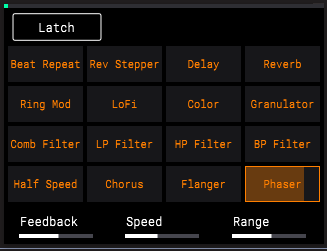
To trigger Pad FX, press PADS 1–16, corresponding to the effect you would like to trigger. The more pressure you apply to the pad, the more the effect is applied to the audio signal.
You can use up to four effects at the same time. If additional effects are triggered, previously engaged effects are bypassed, starting with the first effect engaged. When the additional effects after the fourth are turned off, the bypassed effects will re-engage.
To adjust Pad FX parameters, turn the K1–3 Knobs. See the list below for the available parameters for all effects.
Press the B1 Function Button to Latch an effect at the current amount. Select the pad and press this button again to disable Latch.
|
Pad
|
Effect
|
Description
|
Parameters
|
Values
| ||
|
1
|
Half Speed
|
This effect processes your audio and plays it back at a reduced speed.
|
K1 – Speed
|
x1.5, x2, x4
| ||
|
|
|
K2 – Mix
|
0–100%
| |||
|
2
|
Chorus
|
This effect uses a low-frequency oscillator to modulate the pitch and a delay of the input signal for a shimmering, “watery” sound.
|
K1 – Rate
|
0.40 – 3.20 Hz
| ||
|
|
|
K2 – Depth
|
0–100%
| |||
|
|
|
K3 – Feedback
|
0–100%
| |||
|
3
|
Flanger
|
This effect applies a short, modulating delay to the audio signal, resulting in a signature “whooshing” sound.
|
K1 – Rate
|
0.02 – 10.00 Hz
| ||
|
|
|
K2 – Depth
|
0–100%
| |||
|
|
|
K3 – Feedback
|
0–100%
| |||
|
4
|
Phaser
|
This effect applies modulated filters to the audio signal, resulting in a sharp, “sweeping” sound.
|
K1 – Feedback
|
0–100%
| ||
|
|
|
K2 – Speed
|
2 bars, 1 bar, 1/2, 1/4, 1/4t, 1/8, 1/8t, 1/16, 1/16t, 1/32, 1/64
| |||
|
|
|
K3 – Range
|
0–100%
| |||
|
5
|
Comb Filter
|
This effect creates “notches” in the frequency spectrum by delaying the audio signal and adding it back to itself.
|
K1 – Speed
|
2 bars, 1 bar, 1/2, 1/4, 1/4t, 1/8, 1/8t, 1/16, 1/16t, 1/32, 1/64
| ||
|
6
|
LP Filter
|
This effect applies a low-pass filter, suppressing frequencies above the cutoff point.
|
K1 – Resonance
|
0–100%
| ||
|
|
|
K2 – Speed
|
2 bars, 1 bar, 1/2, 1/4, 1/4t, 1/8, 1/8t, 1/16, 1/16t, 1/32, 1/64
| |||
|
|
|
K3 – Range
|
0–100%
| |||
|
7
|
HP Filter
|
This effect applies a high-pass filter, suppressing frequencies below the cutoff point.
|
K1 – Resonance
|
0–100%
| ||
|
|
|
K2 – Speed
|
2 bars, 1 bar, 1/2, 1/4, 1/4t, 1/8, 1/8t, 1/16, 1/16t, 1/32, 1/64
| |||
|
|
|
K3 – Range
|
0–100%
| |||
|
8
|
BP Filter
|
This effect applies a band-pass filter, suppressing frequencies above and below the cutoff point.
|
K1 – Resonance
|
0–100%
| ||
|
|
|
K2 – Speed
|
2 bars, 1 bar, 1/2, 1/4, 1/4t, 1/8, 1/8t, 1/16, 1/16t, 1/32, 1/64
|
| ||
|
|
|
K3 – Range
|
0–100%
|
| ||
|
|
| |||||
|
Pad
|
Effect
|
Description
|
Parameters
|
Values
|
|
9
|
Ring Mod
|
This modulation effect creates metallic pulsing or ringing sounds by combining audio signals, and at slow speeds creates a “ducking” sound.
|
K1 – Max Freq
|
40.00 – 400.00 Hz
|
|
10
|
LoFi
|
This effect reduces the audio quality of the signal for a lo-fi sound that ranges from subtle to mangled distortion.
|
K1 – Bitcrush
|
24.00 – 2.00
|
|
|
|
K2 – Decimator
|
0–100%
| |
|
11
|
Color
|
This effect applies EQ, noise, and modulation to emulate the sounds of vintage sound equipment.
|
K1 – Mode
|
Cassette, Flutter, Tube Amp, Vinyl, Saturation, Radio
|
|
12
|
Granulator
|
This effect turns your audio into small grains of sound that can be manipulated for sonic experimentation.
|
K1 – Density
|
1.0/s – 300.0/s
|
|
|
|
K2 – Feedback
|
0–100%
| |
|
|
|
K3 – Grain Len
|
10.0 – 200.0 ms
| |
|
13
|
Beat Repeat
|
This stuttering effect loops and repeats your source audio.
|
K1 – Division
|
1/4, 1/4t, 1/8, 1/8t, 1/16, 1/16t, 1/32, 1/64
|
|
|
|
K2 – Reverse
|
Off, On
| |
|
|
|
K3 – Resonance
|
0–100%
| |
|
14
|
Rev Stepper
|
This effect continually slices the incoming audio by the length of the Delay Time parameter. It then plays the slices forwards and reverse as many times as the Repeat parameter dictates.
|
K1 – Delay Time
|
1/4, 1/4t, 1/8, 1/8t, 1/16, 1/16t, 1/32, 1/64
|
|
|
|
K2 – Repeats
|
2–8
| |
|
15
|
Delay
|
This effect adds echo repeats to your source audio.
|
K1 – Time
|
1/1, 1/2, 1/4d, 1/4, 1/4t, 1/8d, 1/8, 1/8t, 1/16d, 1/16, 1/16t, 1/32d, 1/32, 1/32t, 1/64d, 1/64, 1/64t
|
|
|
|
K2 – Feedback
|
0–100%
| |
|
|
|
K3 – Range
|
Normal, X-Feedback, Ping-Pong
| |
|
16
|
Reverb
|
This is a spatial effect, designed to emulate playing audio in an empty space.
|
K1 – Pre-Delay
|
0–250 ms
|
|
|
|
K2 – Decay
|
0–100%
| |
|
|
|
K3 – Diffusion
|
0–100%
|