
Flex Beat
Similar to Pad FX, the pads are used to trigger effects in MPC Sample’s Flex Beat mode, but these are time-based effects that warp the pitch, time, and volume of your sequence for beat chops, DJ-style scratches, and trance gate effects.
 +
+ 
To open the Flex Beat page, press and hold SHIFT and press the PAD FX / FLEX BEAT button.
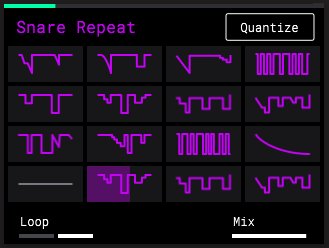
Flex Beat effects are applied to your entire sequence during playback. Press the PLAY button to play your sequence before using Flex Beat.
By default, PAD 1 is active when Flex Beat is entered. This is an EMPTY effect and is the baseline of no change to your audio.
To apply a Flex Beat effect, press PADS 2–16.
Press the B3 Function Button to activate or deactivate Quantize for Flex Beat. When activated, Flex Beat effects are applied starting at the nearest time division.
Turn the K1 Knob to change the Flex Beat mode from One Shot to Loop. In One Shot mode, when a Flex Beat effect is triggered, it automatically returns to the Empty effect (PAD 1) after completion. In Loop mode, each Flex Beat effect will continue to repeat until another effect is selected or the Empty slot is selected.
Turn the K3 Knob to adjust the dry/wet Mix of the Flex Beat effect (0 – 100%). When set to 0%, only the original audio is heard. When set to 100%, the original audio is not heard, and only the Flex Beat affected audio is heard.