
Input Configuration
The Input Configuration menu allows you to select and adjust your audio input sources for sampling.
 +
+ 
To enter the Input Configuration menu, press and hold SHIFT and press the SAMPLE button.
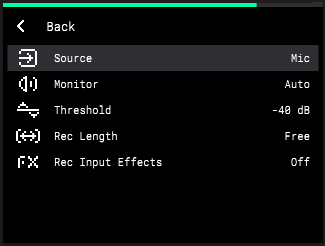
Source:
-
Mic: The built-in microphone, located next to the ENCODER.
-
Rear: The rear panel AUDIO IN connections. Selecting this option enables both the 1/L and 2/R inputs to record in stereo.
-
Rear L: The 1/L AUDIO IN on the rear panel.
-
Rear R: The 2/R AUDIO IN on the rear panel.
-
Resample: Re-recorded audio from MPC Sample. You can use this to record a sequence onto a single pad, freeing up other pads for additional sounds.
-
USB: Audio from a device connected to MPC Sample’s rear panel USB port. Selecting this option records stereo audio from the USB device.
-
USB L: Left-channel audio from a device connected to the USB port.
-
USB R: Right-channel audio from a device connected to the USB port.
Monitor:
-
Off: Audio from the selected Source is never monitored.
-
Auto: Audio from the selected Source is monitored only while Sample Record Mode is in focus.
-
On: Audio from the selected Source is always monitored.
Threshold: This setting determines the minimum audio level (-96 – 0 dB) from the selected audio input Source that must be reached to automatically trigger recording.
Rec Length: This setting determines the length of your recording. When set to FREE, you can record with no set length. When set to SEQ, the recording length is locked to the Sequence length. If SEQ is selected and playback is active, recording begins at the end of the current loop.
Rec Input Effects: This setting determines whether Knob FX triggered during recording are recorded as part of the audio sample (ON) or are excluded from the recording (Off).
To close the Input Configuration menu, press the B3 Function Button to move back to the previous page.