
Song Mode
Song Mode allows you to create a list of sequences, which you can then export as an audio file or as a new sequence in your project.
 +
+ 
To enter song mode, press and hold SHIFT and press PAD 12 – SONG.
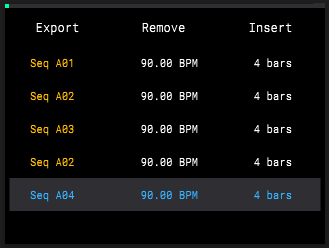
Use the PADS to select a sequence. Filled sequences are brightly lit, while empty sequences are dim.
Press the B3 Function Button to insert the sequence into the song at the current location. Sequences will be placed after the highlighted sequence if there are already sequences in place.
Turn the ENCODER or press the -/+ buttons to browse the list of sequences inserted into the song.
To remove a sequence, highlight it and then press the B2 Function Button.
To hear your song from the beginning, press the PLAY button. Sequences will play back automatically in the order the appear on the Song page.
To hear your song starting from another point, highlight the sequence you want to start from and then press and hold SHIFT and press PLAY/CONTINUE. Playback will begin from the selected sequences and progress through the following sequences.
To export your song, press the B1 Function Button. You can export your song as an audio mixdown or as a new sequence in your project.
Press the B2 Function Button to export your song as an audio mixdown. This allows you to save your song as an audio file which you can then transfer to a computer for sharing.
Turn the ENCODER to scroll through letters and numbers. Press the ENCODER to select the desired character and move to the next character.
Press and hold SHIFT to access capital letters.
Press the -/+ buttons to move between characters.
Press the B2 Function Button to erase the current character.
Press and hold SHIFT and press the B2 Function Button to erase all characters at the same time.
When you have finished editing the song name, press the B3 Function Button (Do It!) to start the export.
To exit the audio export page, press the B1 Function Button (Cancel).
Press the B3 Function Button to export your song as a new sequence. The resulting sequence is automatically added to the next available sequence slot. If the new sequence length is over 128 bars, you will not be able to edit the length of the created sequence.
Press the B1 Function Button to cancel exporting and return to the Song page.